Chapter 4: The Lifeblood (SQL & Databases)
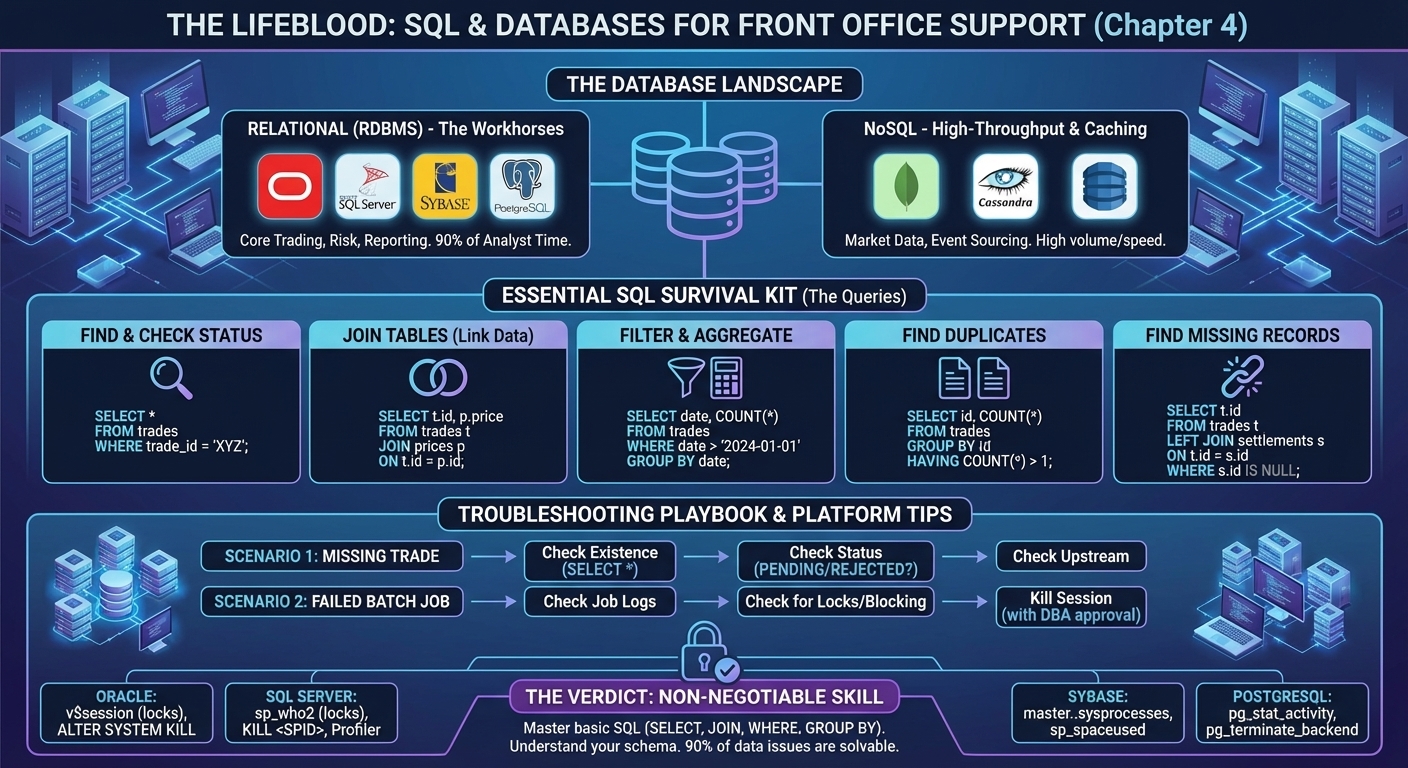
Figure 4: The Database Landscape - RDBMS workhorses (Oracle, SQL Server, Sybase, PostgreSQL) for core trading, NoSQL for high-volume market data. Essential SQL survival kit for finding missing trades.
"Data is the lifeblood of the bank. If you can't query it, you can't fix it." — Database Administrator, a UK bank
Every trade, every price, every risk calculation—it all lives in a database. As a Support Analyst, you won't be designing schemas or tuning indexes (that's the DBA's job), but you must be able to query data to diagnose issues.
At a European bank, I worked with Sybase. At a Swiss bank and a UK bank, it was Oracle and SQL Server. The syntax varies slightly, but the fundamentals are the same: SELECT, JOIN, WHERE, GROUP BY.
This chapter is your SQL survival kit—the queries I used daily to find missing trades, diagnose data issues, and generate reports for the business.
Why SQL Matters
When a trader calls and says "My trade isn't showing up", you need to: 1. Query the database to see if the trade exists. 2. Check if it's in the right state (booked, settled, cancelled). 3. Verify the data matches what the trader expects (price, quantity, counterparty).
You can't do any of that without SQL.
The Databases You'll Encounter
Relational Databases (RDBMS)
These are the workhorses of investment banking. Every trade, every position, every risk calculation lives here.
- Oracle: The 800-pound gorilla. Used for core trading systems, risk engines, and data warehouses. Expensive, but rock-solid. If you're supporting a system that's been around for 10+ years, it's probably Oracle.
- Sybase (SAP ASE): Legacy, but still common in Fixed Income. At a European bank, our Structured Rates system ran on Sybase. It's fast, but the tooling is dated.
- SQL Server: Microsoft's database. Common in .NET shops. Used for reporting, middle-office systems, and data marts. Integrates seamlessly with Windows Server and Active Directory.
- MySQL: Open-source. You'll see it in newer applications, especially web-based trading platforms. Less common in core trading systems.
- PostgreSQL: Open-source, enterprise-grade. Growing in popularity, especially for cloud migrations. More feature-rich than MySQL.
- MariaDB: MySQL fork. Similar use cases. Some banks prefer it for licensing reasons.
- Amazon Aurora: AWS-managed database (MySQL or PostgreSQL compatible). If your bank is moving to the cloud, you'll encounter this.
NoSQL Databases (The New Kids)
NoSQL databases are designed for high-throughput, low-latency workloads. They're not replacing relational databases, but complementing them.
- MongoDB: Document-based (stores JSON-like documents). Used for real-time market data feeds, trade blotters, and event logs. At a UK bank, we used MongoDB to store tick data from Bloomberg.
- Cassandra: Distributed, high-availability. Used for time-series data (e.g., historical prices, tick data). Write-heavy workloads.
- DynamoDB (AWS): Managed NoSQL on AWS. Key-value store. Used for session management, caching, and real-time analytics.
When NoSQL is Used in Trading: * Market Data: Millions of price updates per second. Relational databases can't keep up. NoSQL handles the write volume. * Event Sourcing: Storing every state change of a trade (booked, amended, cancelled, settled). MongoDB or Cassandra. * Caching: Frequently accessed reference data (instrument definitions, counterparty details). DynamoDB or Redis.
The Reality: As a Support Analyst, you'll spend 90% of your time in relational databases. NoSQL is nice to know, but not essential on day one. If you encounter it, the queries are simpler (no JOINs), but the data model is different.
The Essential Queries
Finding a Trade
Real-World Use: Trader reports a missing trade. First thing I do: verify it exists in the database.
Checking Trade Status
Real-World Use: Trade exists, but trader can't see it. Check the status—if it's PENDING or REJECTED, that's why.
Finding Duplicate Trades
Real-World Use: At a UK bank, a bug in the booking system occasionally created duplicate trades. This query found them instantly.
Filtering by Date Range
SELECT trade_id, trade_date, counterparty
FROM trades
WHERE trade_date BETWEEN '2024-01-01' AND '2024-01-31'
  AND counterparty = 'a major counterparty';
Real-World Use: Middle Office asks for all trades with a specific counterparty for the month. Run this query, export to CSV, done.
Joining Tables (The Power Move)
SELECT t.trade_id, t.status, p.price, p.currency
FROM trades t
JOIN prices p ON t.trade_id = p.trade_id
WHERE t.trade_date = '2024-01-15';
Real-World Use: Trader says the price is wrong. Join the trades table with the prices table to see what the system recorded.
Aggregating Data
SELECT counterparty, COUNT(*) AS trade_count, SUM(notional) AS total_notional
FROM trades
WHERE trade_date = '2024-01-15'
GROUP BY counterparty
ORDER BY total_notional DESC;
Real-World Use: Desk head wants a summary of trading activity by counterparty. This query gives them exactly that.
Finding Missing Records
SELECT t.trade_id
FROM trades t
LEFT JOIN settlements s ON t.trade_id = s.trade_id
WHERE s.trade_id IS NULL
  AND t.status = 'BOOKED';
Real-World Use: At a Swiss bank, we had a nightly reconciliation process. This query found trades that were booked but never settled—a red flag for operations.
The Troubleshooting Playbook
Scenario 1: "My trade isn't showing up"
Step 1: Check if it exists
- If no rows: Trade wasn't booked. Check upstream systems (trade capture, blotter). - If exists: Check the status.Step 2: Check the status
-PENDING: Still processing. - REJECTED: Failed validation. Check error logs. - BOOKED: Trade is in the system. Issue might be with the GUI refresh. Scenario 2: "The prices are wrong"
Step 1: Join trades and prices
SELECT t.trade_id, t.instrument, p.price, p.price_source
FROM trades t
JOIN prices p ON t.trade_id = p.trade_id
WHERE t.trade_id = 'TRD123456';
Step 2: Compare with external source (Bloomberg, Reuters) - If the price in the database doesn't match the market, the pricing engine has an issue. - Escalate to the development team.
Scenario 3: "The batch job failed"
Step 1: Check the job log table
SELECT job_name, status, start_time, end_time, error_message
FROM job_logs
WHERE job_name = 'RISK_CALC_BATCH'
  AND run_date = '2024-01-15'
ORDER BY start_time DESC;
Step 2: If the error is a database lock or deadlock, check for blocking sessions
-- Oracle
SELECT blocking_session, sid, serial#, username
FROM v$session
WHERE blocking_session IS NOT NULL;

-- SQL Server
EXEC sp_who2;
Step 3: Kill the blocking session (with DBA approval) or wait for it to complete.
War Story: The Missing Trades (a Swiss bank, 2011)
It was 8:00 AM. The FX desk was screaming. Overnight, 500 trades had been booked, but only 300 were showing up in the risk system.
I queried the trades table:
Next, I checked the risk_positions table:
I joined the tables to find the missing trades:
SELECT t.trade_id
FROM trades t
LEFT JOIN risk_positions r ON t.trade_id = r.trade_id
WHERE t.trade_date = '2011-06-15'
  AND r.trade_id IS NULL;
Found the 200 missing trades. All had status = 'PENDING_APPROVAL'. The overnight batch job only processed BOOKED trades.
Root cause: A new validation rule was introduced, and these trades were stuck in approval. I escalated to the business. They approved the trades manually. Risk positions updated within 10 minutes.
Lesson: Always check the entire data flow, not just one table.
Database Tools You'll Use
- SQL Developer (Oracle): GUI for running queries, viewing schemas.
- SQL Server Management Studio (SSMS): Microsoft's equivalent.
- DBeaver: Open-source, works with any database.
- Command-line clients:
sqlplus(Oracle),isql(Sybase),psql(PostgreSQL).
At a UK bank, I used SQL Developer for ad-hoc queries and sqlplus for automated scripts.
Platform-Specific Survival Tips
Each database has its quirks. Here's what you need to know for the most common platforms.
Oracle: The Enterprise Beast
Why banks love it: Proven reliability. Handles massive transaction volumes. Enterprise support.
What you'll do: * Check for blocking sessions:
SELECT blocking_session, sid, serial#, username, sql_id
FROM v$session
WHERE blocking_session IS NOT NULL;
SELECT tablespace_name,
       ROUND(SUM(bytes)/1024/1024/1024, 2) AS size_gb,
       ROUND(SUM(maxbytes)/1024/1024/1024, 2) AS max_size_gb
FROM dba_data_files
GROUP BY tablespace_name;
$ORACLE_BASE/diag/rdbms/.../trace/alert_<SID>.log) War Story (UK Bank, 2013): A batch job failed with "ORA-01555: snapshot too old." This happens when a long-running query can't find the data it needs because it's been overwritten. Solution: Increase the UNDO_RETENTION parameter (DBA did this) and optimize the query to run faster.
SQL Server: The Microsoft Workhorse
Why banks use it: Tight integration with .NET applications. Familiar to Windows admins. Good for reporting.
What you'll do: * Check for blocking:
Look forBlkBy column (blocking session ID). * Kill a session: * Check database size: * View recent errors: * Check execution plan (if a query is slow): In SSMS, click "Display Estimated Execution Plan" before running the query. Look for table scans (bad) vs index seeks (good). SQL Server Profiler: This tool captures every query hitting the database. Use it to diagnose slow queries or find out what a misbehaving application is doing.
War Story (UK Bank, 2014): A .NET reporting service was timing out. I ran SQL Server Profiler and found it was executing a query with a missing index. The query was doing a full table scan on a 50-million-row table. I suggested the index to the DBA. Query time dropped from 5 minutes to 2 seconds.
Sybase: The Legacy Survivor
Why it's still around: Banks don't migrate unless they have to. If it works, don't touch it.
What you'll do: * Check for blocking:
* Kill a session: * Check database size:The Challenge: Sybase tooling is dated. You'll likely use isql (command-line) more than a GUI.
MySQL / PostgreSQL / MariaDB: The Open-Source Trio
Why banks use them: Cost (free), flexibility, cloud-friendly.
What you'll do (PostgreSQL example): * Check for blocking:
* Kill a session: * Check database size:MySQL is similar, but uses SHOW PROCESSLIST and KILL <id>.
NoSQL: MongoDB Example
What you'll do: * Find a document:
* Count documents: * Check database size:The Difference: No SQL. You use JavaScript-like syntax. No JOINs (you embed related data in the same document or use references).
What You Don't Need to Know (Yet)
As a Support Analyst, you're not expected to: * Design database schemas. * Write stored procedures or triggers. * Tune indexes or optimize query performance (unless it's causing a production issue). * Manage backups and replication.
Those are the DBA's responsibilities. Your job is to query data and diagnose issues.
The Verdict
SQL is non-negotiable. If you can't write a SELECT statement with a JOIN and a WHERE clause, you'll struggle in this role.
Action Items: 1. Practice on a sample database: Download a dataset (e.g., Northwind, AdventureWorks) and write queries. 2. Learn the basics: SELECT, JOIN, WHERE, GROUP BY, HAVING, ORDER BY. 3. Understand your schema: When you start a new role, spend the first week learning the database structure. Which tables store trades? Which store prices? Which store risk?
If you can do those three things, you'll be able to diagnose 90% of data-related issues. For how to apply these SQL skills during live incidents, see Chapter 7: Rules of Engagement. For understanding the business context behind the data (what trades, prices, and risk calculations actually mean), see Chapter 8: The Economic War Theatre.
Next up: Chapter 5 - The Glue (Scripting & Automation).