Chapter 5: The Glue (Scripting & Automation)
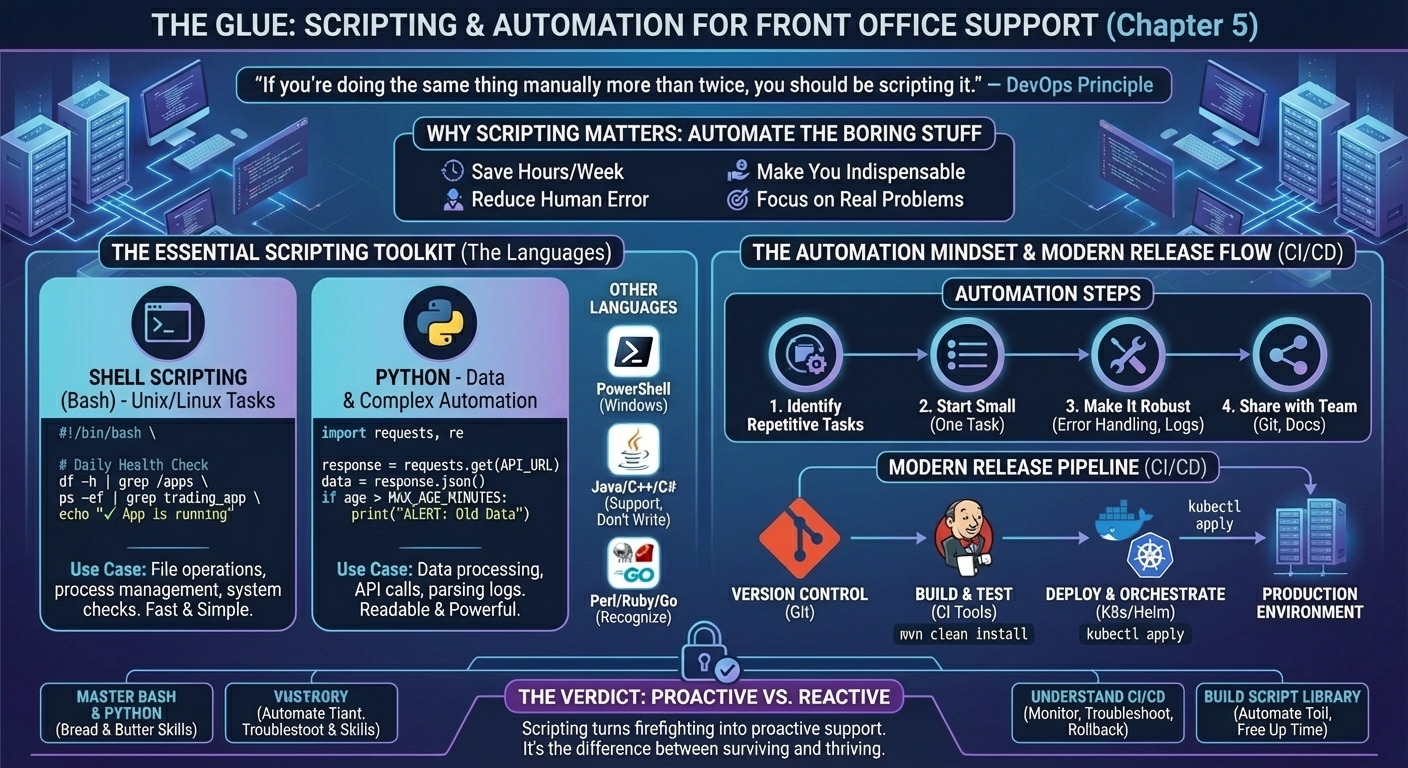
Figure 5: The Automation Factory - Bash for Unix tasks, Python for data/complex automation. Automate the boring stuff to focus on real problems. CI/CD pipeline from version control to production.
"If you're doing the same thing manually more than twice, you should be scripting it." — DevOps Principle
You've mastered Unix commands. You can write SQL queries. But here's the truth: the best Support Analysts are lazy. Not lazy in the sense of avoiding work—lazy in the sense of automating repetitive tasks so they can focus on solving real problems.
This is where scripting comes in. Whether it's Bash, Python, or PowerShell, the ability to write simple scripts will: * Save you hours every week. * Reduce human error. * Make you indispensable to your team.
This chapter covers the scripting skills I used daily to automate health checks, parse logs, and generate reports.
Why Scripting Matters
As a Support Analyst, you'll do the same tasks repeatedly: * Start-of-Day checks: Is the app running? Are the logs clean? Is the database reachable? * Log parsing: Find errors in 10GB log files. * Data extraction: Pull trade data from the database and format it for the business. * Incident response: Restart services, check connectivity, gather diagnostics.
Doing these manually every day is soul-crushing. Scripting lets you automate the boring stuff.
The Two Languages You Need
Shell Scripting (Bash)
- Use case: Automating Unix/Linux tasks (file operations, process management, system checks).
- Pros: Already installed on every Unix server. Fast for simple tasks.
- Cons: Syntax can be cryptic. Not great for complex logic.
Python
- Use case: Data processing, API calls, complex automation.
- Pros: Readable, powerful libraries, great for parsing logs and working with databases.
- Cons: Requires installation (though it's on most modern servers).
My approach: Use Bash for quick system tasks. Use Python for anything involving data processing or APIs.
The Scripting Landscape (What Else Exists)
Bash and Python will cover 90% of your needs. But you'll encounter other scripting languages in the wild. Here's what they are and when they're used.
Unix/Linux Scripting
- Awk: Text processing powerhouse. Great for parsing structured data (CSV, logs). Example:
awk '{print $1, $3}' file.txt(print columns 1 and 3). - Sed: Stream editor. Find-and-replace in files. Example:
sed 's/ERROR/WARNING/g' app.log(replace ERROR with WARNING). - Perl: The "Swiss Army knife" of scripting. Powerful text processing, but syntax is cryptic. Legacy systems still use it. If you see
.plfiles, that's Perl.
Reality Check: You don't need to master Awk, Sed, or Perl. But you should recognize them and be able to read basic scripts. Google is your friend.
Windows Scripting
- PowerShell: The Windows equivalent of Bash. If you're supporting .NET applications on Windows Server, you'll use this daily. (See Chapter 3 for PowerShell examples.)
- Batch Files (
.bat): Old-school Windows scripting. Still used for simple tasks (starting services, copying files). Syntax is clunky, but it works. - VBScript: Legacy. You'll see it in old automation scripts. Being phased out in favor of PowerShell.
Niche Scripting Languages
- PHP: Web scripting. Rare in trading systems, but you might see it in internal tools or dashboards.
- Lua: Lightweight scripting. Used in some embedded systems or game engines. Unlikely in banking, but I've seen it in niche applications.
The Takeaway: Focus on Bash and Python. Learn PowerShell if you're in a Windows-heavy environment. Everything else is optional.
Shell Scripting: The Basics
Example 1: Start-of-Day Health Check
At the UK bank, I had a script that ran every morning at 6:30 AM to check system health.
#!/bin/bash
# Daily health check script

echo "=== $(date) ==="
echo ""

# Check disk space
echo "Disk Space:"
df -h | grep -E "/$|/apps"
echo ""

# Check if trading app is running
echo "Trading App Status:"
if ps -ef | grep -v grep | grep trading_app > /dev/null; then
    echo "✓ Trading app is running"
else
    echo "✗ Trading app is NOT running - ALERT!"
fi
echo ""

# Check database connectivity
echo "Database Connectivity:"
if nc -zv db-server 1521 2>&1 | grep succeeded > /dev/null; then
    echo "✓ Database is reachable"
else
    echo "✗ Database is NOT reachable - ALERT!"
fi
echo ""

# Check for errors in last hour of logs
echo "Recent Errors (last hour):"
find /apps/trading/logs -name "*.log" -mmin -60 -exec grep -i "ERROR\|FATAL" {} \; | tail -10
What it does: * Checks disk space. * Verifies the trading app is running. * Tests database connectivity. * Finds recent errors in logs.
I scheduled this via cron to run daily and email the results to the team. Saved us 30 minutes every morning.
Example 2: Automated Log Cleanup
Disk space issues were a recurring problem. I wrote a script to clean up old logs automatically.
#!/bin/bash
# Clean up logs older than 30 days

LOG_DIR="/apps/trading/logs"
DAYS_TO_KEEP=30

echo "Cleaning up logs older than $DAYS_TO_KEEP days in $LOG_DIR"

# Find and delete old logs
find $LOG_DIR -name "*.log" -mtime +$DAYS_TO_KEEP -exec rm -f {} \;

echo "Cleanup complete. Current disk usage:"
df -h | grep /apps
Scheduled via cron:
This prevented the "disk full" incidents that used to wake me up at 3 AM.
Example 3: Restart Script with Logging
When the pricing engine hung, I needed to restart it quickly. This script automated the process and logged everything.
#!/bin/bash
# Restart pricing engine

APP_NAME="pricing_engine"
LOG_FILE="/apps/logs/restart_$(date +%Y%m%d_%H%M%S).log"

echo "$(date): Starting restart of $APP_NAME" | tee -a $LOG_FILE

# Stop the app
echo "$(date): Stopping $APP_NAME..." | tee -a $LOG_FILE
./stop_pricing.sh >> $LOG_FILE 2>&1

# Wait for process to die
sleep 5

# Verify it's stopped
if ps -ef | grep $APP_NAME | grep -v grep > /dev/null; then
    echo "$(date): ERROR - $APP_NAME did not stop cleanly" | tee -a $LOG_FILE
    exit 1
fi

# Start the app
echo "$(date): Starting $APP_NAME..." | tee -a $LOG_FILE
./start_pricing.sh >> $LOG_FILE 2>&1

# Verify it started
sleep 10
if ps -ef | grep $APP_NAME | grep -v grep > /dev/null; then
    echo "$(date): SUCCESS - $APP_NAME is running" | tee -a $LOG_FILE
else
    echo "$(date): ERROR - $APP_NAME failed to start" | tee -a $LOG_FILE
    exit 1
fi
Why this is better than manual restarts: * Everything is logged (for incident reports). * Consistent process (no missed steps). * Can be run remotely or scheduled.
Python Scripting: The Power Tool
Example 1: Parsing Logs for Errors
At the Swiss bank, I needed to analyze 10GB log files to find patterns in errors. Bash wasn't cutting it. Python made it trivial.
#!/usr/bin/env python3
import re
from collections import Counter

log_file = "/apps/trading/logs/app.log"
error_pattern = re.compile(r"ERROR.*?(\w+Exception)")

errors = []

with open(log_file, 'r') as f:
    for line in f:
        match = error_pattern.search(line)
        if match:
            errors.append(match.group(1))

# Count occurrences
error_counts = Counter(errors)

print("Top 10 Errors:")
for error, count in error_counts.most_common(10):
    print(f"{error}: {count}")
Output:
Top 10 Errors:
NullPointerException: 342
TimeoutException: 156
DatabaseConnectionException: 89
...
This helped me identify that NullPointerException was the root cause of 60% of incidents. I escalated to the dev team with data.
Example 2: Automated Trade Reconciliation
Middle Office needed a daily report of trades that were booked but not settled. I automated it with Python.
#!/usr/bin/env python3
import cx_Oracle
import csv
from datetime import datetime

# Database connection
conn = cx_Oracle.connect('user/password@db-server:1521/service')
cursor = conn.cursor()

# Query for unreconciled trades
query = """
SELECT t.trade_id, t.trade_date, t.counterparty, t.notional
FROM trades t
LEFT JOIN settlements s ON t.trade_id = s.trade_id
WHERE t.status = 'BOOKED'
  AND s.trade_id IS NULL
  AND t.trade_date = TRUNC(SYSDATE)
"""

cursor.execute(query)
results = cursor.fetchall()

# Write to CSV
filename = f"unreconciled_trades_{datetime.now().strftime('%Y%m%d')}.csv"
with open(filename, 'w', newline='') as csvfile:
    writer = csv.writer(csvfile)
    writer.writerow(['Trade ID', 'Trade Date', 'Counterparty', 'Notional'])
    writer.writerows(results)

print(f"Report generated: {filename}")
print(f"Total unreconciled trades: {len(results)}")

cursor.close()
conn.close()
Scheduled via cron:
Middle Office loved it. I went from manually running queries every day to having the report auto-generated and emailed.
Example 3: API Integration (Checking Market Data Feed)
At the Japanese bank, we had a market data feed that occasionally went stale. I wrote a Python script to check the feed and alert if data was outdated.
#!/usr/bin/env python3
import requests
from datetime import datetime, timedelta

API_URL = "https://market-data-api.internal/latest"
MAX_AGE_MINUTES = 5

response = requests.get(API_URL)
data = response.json()

last_update = datetime.fromisoformat(data['last_update'])
now = datetime.now()
age = (now - last_update).total_seconds() / 60

if age > MAX_AGE_MINUTES:
    print(f"ALERT: Market data is {age:.1f} minutes old (threshold: {MAX_AGE_MINUTES} min)")
    # Send alert (email, Slack, PagerDuty, etc.)
else:
    print(f"OK: Market data is {age:.1f} minutes old")
Scheduled via cron to run every 5 minutes during trading hours.
The Automation Mindset
Here's how I approached automation:
Identify Repetitive Tasks
- What do I do every day/week?
- What takes more than 5 minutes?
- What requires multiple manual steps?
Start Small
- Don't try to automate everything at once.
- Pick one annoying task and script it.
- Iterate and improve.
Make It Robust
- Add error handling (what if the database is down?).
- Log everything (for debugging and audit trails).
- Test in a non-production environment first.
Share with the Team
- Document your scripts (comments, README files).
- Store them in version control (Git).
- Train your colleagues to use them.
Tools & Libraries to Know
Bash
grep,awk,sed: Text processing.cron: Scheduling.nc(netcat): Network connectivity testing.
Python
requests: API calls.cx_Oracle,psycopg2,pymssql: Database connections.pandas: Data analysis (if you're doing heavy data work).smtplib: Sending emails.
The Compiled Languages (What You'll Support, Not Write)
As a Support Analyst, you won't be writing production code in compiled languages. But you'll be supporting applications written in them. Here's what you need to know.
Java
The Workhorse: Most trading systems are written in Java. High performance, enterprise-grade, runs on the JVM (Java Virtual Machine).
What you'll do:
- Check if a Java app is running:
ps -ef | grep java - Restart a Java app:
./start.sh(which callsjava -jar trading-app.jar) - Read stack traces: When a Java app crashes, you'll see a stack trace in the logs. You don't need to fix the code, but you need to identify the error and escalate to developers.
- Monitor JVM memory: Java apps can have memory leaks. Use
jstator monitoring tools to track heap usage.
Example Stack Trace:
java.lang.NullPointerException: Cannot invoke method on null object
    at com.bank.trading.PricingEngine.calculatePrice(PricingEngine.java:142)
    at com.bank.trading.TradeProcessor.process(TradeProcessor.java:89)
C++
The Speed Demon: Used for low-latency trading systems where microseconds matter. High-frequency trading (HFT) firms love C++.
What you'll do:
- Restart C++ apps: Similar to Java, but often compiled binaries (e.g.,
./pricing_engine). - Read core dumps: When a C++ app crashes, it generates a core dump file. You'll need to provide this to developers for debugging.
- Monitor performance: C++ apps are optimized for speed. If latency increases, it's a red flag.
Reality Check: C++ is harder to debug than Java. You'll rely heavily on developers.
C# (.NET)
The Microsoft Stack: Used for Windows-based trading applications, reporting tools, and middle-office systems.
What you'll do:
- Restart .NET services:
Restart-Service "TradingService"(PowerShell) - Check Event Viewer: .NET apps log errors to Windows Event Viewer.
- Read stack traces: Similar to Java, but in C# syntax.
Example:
System.NullReferenceException: Object reference not set to an instance of an object.
   at TradingApp.PricingEngine.CalculatePrice() in PricingEngine.cs:line 142
Ruby
The Rare One: Occasionally used for internal tools, automation scripts, or web applications. Not common in core trading systems.
Groovy
The Jenkins Sidekick: Groovy is used to write Jenkins pipelines (CI/CD automation). You won't write Groovy apps, but you might edit Jenkins pipeline scripts.
Example Jenkins Pipeline (Groovy):
pipeline {
    agent any
    stages {
        stage('Build') {
            steps {
                sh 'mvn clean install'
            }
        }
        stage('Deploy') {
            steps {
                sh './deploy.sh'
            }
        }
    }
}
Go (Golang)
The Modern Choice: Fast, simple, great for microservices and cloud-native applications. Growing in popularity for new trading systems.
What you'll do: * Restart Go apps: ./trading-service (compiled binary) * Check logs: Go apps typically log to stdout/stderr or files.
The Takeaway: You don't need to code in these languages. But you need to:
- Recognize them (file extensions:
.java,.cpp,.cs,.rb,.go). - Restart applications written in them.
- Read error messages and escalate to developers with context.
Release Management & CI/CD (The Modern Reality)
In the old days, code releases were manual nightmares. Developers would hand you a .jar file or a .zip archive, and you'd deploy it to production at 2 AM on a Saturday.
Today, most banks use CI/CD (Continuous Integration / Continuous Deployment) pipelines. Code is automatically built, tested, and deployed. As a Support Analyst, you need to understand this ecosystem because: * You'll troubleshoot failed deployments. * You'll roll back bad releases. * You'll monitor the pipeline for issues.
Version Control: Git
What it is: A system for tracking changes to code. Every change is recorded, and you can revert to any previous version.
Why it matters: When a release breaks production, you need to know: * What changed? * Who changed it? * Can we roll back?
Git answers all three questions.
The Platforms:
- GitHub: Most popular. Used by open-source projects and many enterprises.
- GitLab: Enterprise-friendly. Includes built-in CI/CD.
- Bitbucket: Atlassian's offering. Integrates with Jira.
What you'll do:
- Clone a repository:
git clone https://github.com/bank/trading-app.git - Check the commit history:
git log(see what changed recently) - Revert to a previous version:
git checkout <commit-hash>
GitFlow: A branching strategy. Code moves through: * develop branch (active development) * release branch (testing) * main / master branch (production)
Tools:
- GitBash: Git command-line for Windows.
- GitKraken: GUI for Git (easier for beginners).
Build Tools: Maven & Gradle
What they do: Compile code, run tests, package applications.
Maven (Java):
Produces a.jar or .war file ready for deployment. Gradle (Java, Kotlin, Groovy):
Faster than Maven, more flexible.What you'll do: If a build fails, you'll check the logs:
CI/CD Pipelines: Jenkins, TeamCity, CircleCI, GitLab CI
What they do: Automate the build-test-deploy process.
Jenkins (Most Common): * Open-source. * Highly customizable (via plugins). * Pipelines written in Groovy.
What you'll do:
- Check pipeline status: Is the build passing or failing?
- Restart a failed build: Sometimes builds fail due to transient issues (network glitch, resource contention).
- Read build logs: Identify why a build failed.
Example Jenkins Pipeline:
pipeline {
    agent any
    stages {
        stage('Build') {
            steps {
                sh 'mvn clean install'
            }
        }
        stage('Test') {
            steps {
                sh 'mvn test'
            }
        }
        stage('Deploy to UAT') {
            steps {
                sh './deploy_uat.sh'
            }
        }
    }
}
TeamCity: JetBrains' CI/CD tool. Similar to Jenkins, but with a better UI.
CircleCI: Cloud-based CI/CD. Popular with startups and cloud-native companies.
GitLab CI: Built into GitLab. Pipelines defined in .gitlab-ci.yml files.
Deployment & Orchestration: Kubernetes, Helm, Rancher
Kubernetes (K8s): The industry standard for container orchestration. Trading applications are increasingly deployed as containers (Docker) managed by Kubernetes.
What it is: A platform for running and managing containerized applications across multiple servers.
What you'll do:
- Check pod status:
kubectl get pods(are the trading app containers running?) - View logs:
kubectl logs <pod-name> - Restart a pod:
kubectl delete pod <pod-name>(Kubernetes will automatically recreate it) - Scale up/down:
kubectl scale deployment trading-app --replicas=5
Helm: A "package manager" for Kubernetes. Simplifies deployments.
helm install trading-app ./trading-app-chart
helm upgrade trading-app ./trading-app-chart
helm rollback trading-app
Rancher: A GUI for managing Kubernetes clusters. Easier than command-line for beginners.
Spinnaker: Multi-cloud deployment tool. Used for complex, multi-region deployments.
Argo CD: GitOps tool. Deployments are triggered by Git commits.
War Story (Government Agency, 2019): A Kubernetes pod was crash-looping (restarting every 30 seconds). I checked the logs:
Error:OOMKilled (Out of Memory). The pod was allocated 512MB, but the app needed 1GB. I updated the Helm chart to increase memory: Redeployed. Problem solved. Infrastructure as Code: Terraform, CloudFormation, Ansible, Chef
What it is: Managing infrastructure (servers, networks, databases) using code instead of manual configuration.
Terraform (HashiCorp): * Cloud-agnostic (works with AWS, Azure, GCP). * Define infrastructure in .tf files.
Example:
resource "aws_instance" "trading_server" {
  ami           = "ami-12345678"
  instance_type = "t3.large"
}
CloudFormation (AWS): * AWS-specific. * Define infrastructure in YAML or JSON.
Ansible: * Configuration management. * Automate server setup (install packages, configure services).
Chef: * Similar to Ansible. * Uses Ruby-based DSL.
What you'll do: You won't write Terraform or Ansible scripts from scratch, but you'll:
- Run deployments:
terraform apply - Troubleshoot failures: Read error messages, check logs.
- Roll back changes:
terraform destroyor revert to previous version.
AWS Deployment Tools: CodeDeploy, CodePipeline
CodeDeploy: Automates application deployments to EC2 instances, Lambda, or on-premises servers.
CodePipeline: Orchestrates the entire CI/CD process (build, test, deploy).
What you'll do:
- Monitor deployments: Check AWS Console for deployment status.
- Roll back: If a deployment fails, trigger a rollback to the previous version.
The Support Analyst's Role in CI/CD
You're not building the pipelines (that's DevOps), but you're operating them: 1. Monitor pipeline health: Are builds passing? Are deployments succeeding? 2. Troubleshoot failures: Why did the build fail? Why didn't the deployment complete? 3. Coordinate releases: Work with developers to schedule deployments during low-traffic windows. 4. Roll back bad releases: If a deployment breaks production, you need to revert quickly. 5. Document incidents: What went wrong? How was it fixed? How do we prevent it next time?
War Story (UK Bank, 2014): A Jenkins pipeline deployed a buggy release to production at 8 AM (market open). Traders couldn't see their positions. I: 1. Checked Jenkins logs: Deployment succeeded (so it wasn't a deployment failure). 2. Checked application logs: NullPointerException in the new code. 3. Rolled back: Redeployed the previous version via Jenkins. 4. Traders back online in 10 minutes.
Lesson: Always have a rollback plan. Know how to revert to the last known good version.
What You Don't Need to Know (Yet)
As a Support Analyst, you're not expected to:
- Write production-grade applications in Java, C++, or C#.
- Build CI/CD pipelines from scratch (that's DevOps).
- Design Kubernetes clusters or Terraform infrastructure.
- Master advanced algorithms or data structures.
Your job is to:
- Operate the systems (restart apps, check logs, monitor pipelines).
- Troubleshoot when things break (read error messages, identify root causes).
- Automate repetitive tasks (write scripts to save time).
Your scripts should be simple, readable, and solve a specific problem. If it saves you 10 minutes a day, it's worth it.
The Verdict
Scripting and automation are the difference between a reactive Support Analyst (constantly firefighting) and a proactive one (automating toil and focusing on high-value work).
Understanding the CI/CD ecosystem makes you indispensable. When a deployment fails at 2 AM, you're the one who knows how to roll it back.
Action Items:
- Master Bash and Python: These are your bread and butter.
- Learn Git basics: Clone, commit, log, checkout.
- Understand your bank's CI/CD tools: Is it Jenkins? GitLab CI? Kubernetes? Spend a week learning the basics.
- Pick one repetitive task and script it this week.
- Build a personal library of scripts you can reuse across roles.
If you can automate your daily checks, troubleshoot CI/CD pipelines, and roll back bad deployments, you'll free up hours every week—and become the person everyone wants on their team.
Next up: Chapter 6 - The Arsenal (Day-to-Day Toolkit).