Chapter 7: Rules of Engagement (Incident Management)
"When the screen goes red, everyone is watching. How you respond defines your career." — Desk Head
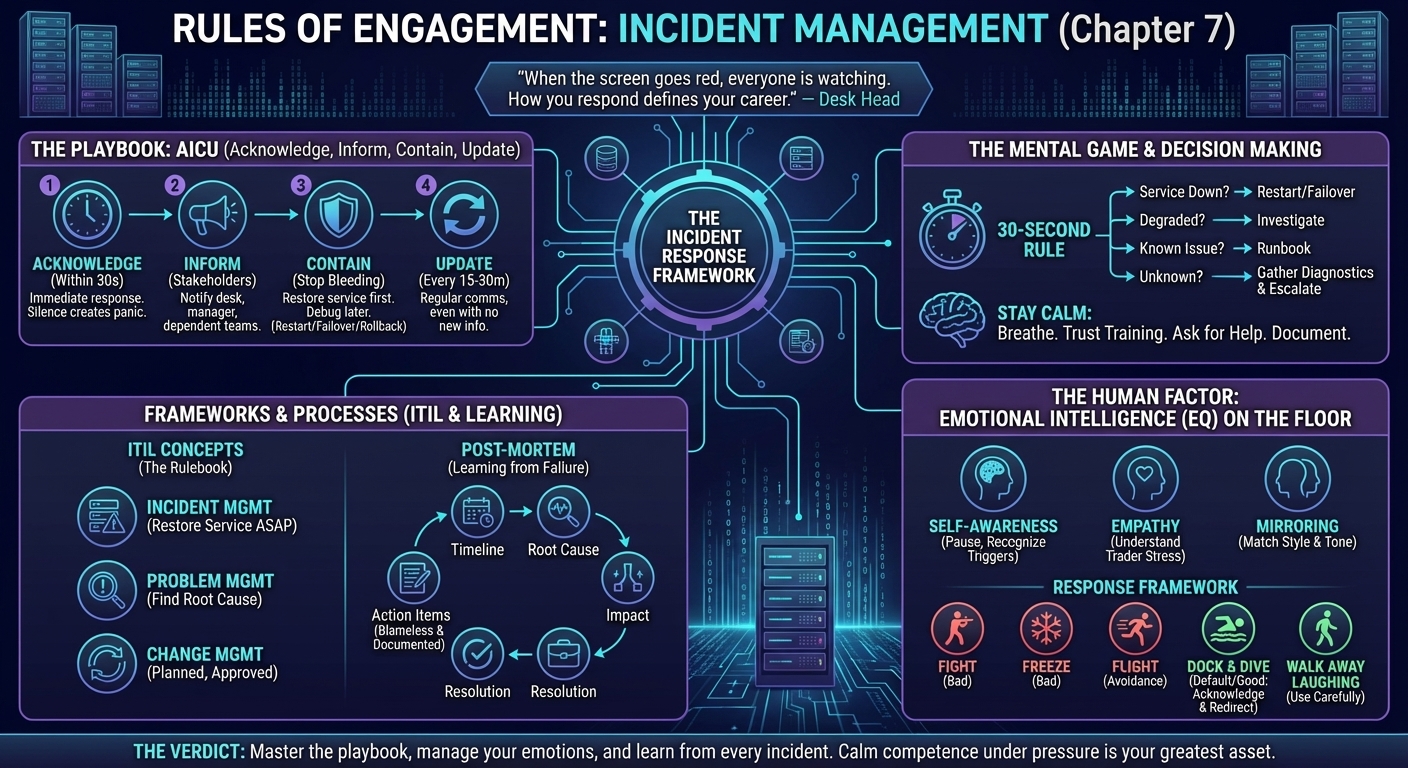
You've got the tools. You know the commands. Now comes the hard part: managing a live incident while traders are screaming, your manager is asking for updates, and you're trying to diagnose the issue without making it worse.
This chapter is about incident management—the protocols, communication strategies, and mental frameworks that kept me sane during hundreds of production outages.
The Playbook: Acknowledge, Inform, Contain, Update
When something breaks, follow this sequence. (For the specific Unix commands and SQL queries you'll need, see Chapter 3: The Engine Room and Chapter 4: The Lifeblood.)
Acknowledge (Within 30 Seconds)
The Rule: As soon as you see an alert or get a call, acknowledge it immediately.
Why: Traders need to know someone is on it. Silence creates panic.
How:
- If it's a phone call: "I see it. I'm investigating. I'll update you in 5 minutes."
- If it's an email/Slack: Reply immediately: "Acknowledged. Investigating."
- If it's a ticket: Update the status to "In Progress" and add a comment.
Real-World Example (Swiss Bank, 2011): At 8:15 AM, the FX pricing screen went blank. My phone rang within 10 seconds. I answered: "I see it. Checking the pricing engine now. I'll call you back in 5 minutes."
That bought me time to diagnose without the trader calling every 30 seconds.
Inform (Who Needs to Know?)
The Rule: Notify stakeholders immediately. Don't wait until you have all the answers.
Who to inform:
- The affected desk: Traders, desk head.
- Your manager: They need to know if it's escalating.
- Dependent teams: If the pricing engine is down, the risk team can't calculate positions.
How:
- Email: For non-critical issues or updates.
- Phone call: For P1 (critical) incidents.
- Bridge call: For major incidents involving multiple teams.
Template:
Subject: [P1] FX Pricing Engine Down

Issue: FX pricing screen showing no data since 08:15.
Impact: FX desk cannot see live prices.
Status: Investigating. Checking pricing engine logs.
Next Update: 08:30 (15 minutes).
Contain (Stop the Bleeding)
The Rule: Your first priority is to restore service, not to find the root cause.
Strategies:
- Restart the service: If it's a known flaky component, restart it.
- Failover: Switch to a backup server.
- Rollback: If a recent deployment caused the issue, roll it back.
- Isolate: If one server is causing problems, take it out of the load balancer.
Real-World Example (UK Bank, 2014): The overnight risk calculation failed. I didn't have time to debug the root cause. I:
- Restarted the job manually.
- Watched it complete successfully.
- Informed the desk: "Risk reports are available."
- Then investigated the root cause (database lock).
Lesson: Restore service first. Debug later.
Update (Every 15-30 Minutes)
The Rule: Even if you have no new information, send an update.
Why: Silence makes people anxious. Regular updates show you're on it.
Template:
08:30 Update:
- Pricing engine logs show database connection timeout.
- Restarted pricing engine. Service restored at 08:28.
- Traders can now see live prices.
- Root cause: Investigating database performance.
Next Update: 09:00.
Real-World Example (Japanese Bank, 2012): During a 4-hour incident, I sent updates every 30 minutes. Even when I had nothing new to report, I'd say: "Still investigating. No change in status. Next update at 11:00."
The desk head later told me: "I appreciated the updates. I knew you hadn't forgotten about us."
The 30-Second Rule
The Rule: You have 30 seconds to decide your next action during an incident.
Why: Paralysis kills. You need to act fast, even if you don't have perfect information.
Decision Tree:
- Is service down? → Restart/failover immediately.
- Is it degraded but functional? → Investigate without restarting.
- Is it a known issue? → Follow the runbook.
- Is it unknown? → Gather diagnostics (logs, metrics) and escalate.
Real-World Example (Swiss Bank, 2011): A trade booking system was slow but not down. I had 30 seconds to decide:
- Option A: Restart the app (risky—might lose in-flight trades).
- Option B: Investigate performance (safe but slow).
I chose Option B. Checked the database—found a long-running query. Killed it. Performance restored. No restart needed.
Incident vs. Change Management
Incident Management: Reactive. Something broke. Fix it now.
Change Management: Proactive. You're making a planned change (deployment, config update).
Key Differences
| Incident | Change |
|---|---|
| Unplanned | Planned |
| Restore service ASAP | Follow approval process |
| Document after the fact | Document before execution |
| P1/P2 priority | Scheduled window |
Real-World Example (UK Bank, 2013):
- Incident: Pricing engine crashed at 9 AM. I restarted it immediately. Documented in ServiceNow afterward.
- Change: Deploying a new version of the pricing engine. I submitted a Change Request 3 days in advance, got approval from the Change Advisory Board (CAB), and deployed during a scheduled maintenance window.
Lesson: Don't confuse the two. If you treat every incident like a change (waiting for approvals), you'll get fired. If you treat every change like an incident (no approvals), you'll also get fired.
War Story: The P1 Incident That Lasted 6 Hours (UK Bank, 2014)
The Setup: It was a Friday. 2:00 PM. The risk calculation batch job failed. This job calculated exposure for the entire Structured Rates desk. Without it, traders couldn't see their positions. Markets closed in 2 hours.
The Incident:
- 2:00 PM: Job failed. I restarted it. Failed again.
- 2:15 PM: Checked logs. Error: "Deadlock detected in database."
- 2:20 PM: Called the DBA. They found a blocking session. Killed it. Restarted the job.
- 2:45 PM: Job failed again. Same error.
- 3:00 PM: Escalated to the development team. They suspected a recent code change.
- 3:30 PM: Dev team rolled back the deployment. Restarted the job.
- 4:00 PM: Job completed successfully.
The Communication: I sent updates every 15 minutes to:
- The desk head.
- My manager.
- The middle office (who needed the risk data for settlement).
The Aftermath:
- Root Cause: A new feature introduced a database deadlock under high load.
- Fix: Dev team added retry logic and optimized the SQL query.
- Post-Mortem: We held a meeting the following Monday. I presented the timeline, root cause, and lessons learned.
Lesson: Stay calm. Communicate constantly. Escalate early.
The Post-Mortem (Learning from Failure)
After every major incident, hold a post-mortem (also called a "lessons learned" or "retrospective").
The Format
- Timeline: What happened and when?
- Root Cause: Why did it happen?
- Impact: Who was affected? For how long?
- Resolution: How was it fixed?
- Action Items: What will we do to prevent this in the future?
The Rules
- Blameless: Don't point fingers. Focus on the system, not the person.
- Actionable: Every post-mortem should result in concrete action items (e.g., "Add monitoring for database deadlocks").
- Documented: Store it in your knowledge base (Confluence, SharePoint).
Real-World Example (Swiss Bank, 2011): After a pricing engine outage, we held a post-mortem. Action items:
- Add a health check that alerts if the pricing engine hasn't updated in 5 minutes.
- Implement automatic failover to a backup server.
- Document the restart procedure in a runbook.
These changes prevented the same issue from happening again.
The Mental Game
Incident management is stressful. Here's how I stayed sane:
1. Breathe
When the phone rings at 3 AM, take 3 deep breaths before answering. Panic makes you stupid.
2. Trust Your Training
You've practiced this. You know the commands. You know the tools. Execute.
3. Ask for Help
If you're stuck, escalate. Don't waste 2 hours trying to solve something alone when a senior engineer could fix it in 10 minutes.
4. Document Everything
Write down what you did, when you did it, and why. This protects you and helps the next person.
The Verdict
Incident management is where you prove your worth. Anyone can run commands when things are working. The best Support Analysts are the ones who stay calm, communicate clearly, and restore service under pressure.
Action Items:
- Practice the playbook: Acknowledge, Inform, Contain, Update.
- Learn the 30-second rule: Make fast decisions with imperfect information.
- Document everything: Every incident is a learning opportunity.
If you can master incident management, you'll be the person everyone wants on-call.
The Framework: ITIL (The Industry Standard)
You'll hear "ITIL" mentioned constantly in investment banks. Here's what it is and why it matters.
What is ITIL?
ITIL (Information Technology Infrastructure Library): A set of best practices for IT service management. Think of it as the "rulebook" for how IT should operate.
Why banks care: Regulators require banks to demonstrate controlled, auditable processes. ITIL provides that framework.
ITIL v3 vs. ITIL v4
- ITIL v3 (2007): Process-focused. Defines specific processes (Incident Management, Change Management, etc.).
- ITIL v4 (2019): Value-focused. More flexible, emphasizes collaboration and continuous improvement.
Most banks are still on ITIL v3 or transitioning to v4.
Core ITIL Principles (What You Need to Know)
1. Incident Management
Definition: Restore normal service as quickly as possible.
Key Concepts:
- Incident: An unplanned interruption (e.g., pricing engine down).
- Priority: Based on Impact (how many users affected?) and Urgency (how quickly must it be fixed?).
- Escalation: When to involve senior engineers or management.
Real-World Application: Everything I described earlier (Acknowledge, Inform, Contain, Update) is ITIL Incident Management.
2. Problem Management
Definition: Identify and eliminate the root cause of recurring incidents.
Key Difference from Incident Management:
- Incident: "The pricing engine crashed. Restart it."
- Problem: "The pricing engine crashes every Friday. Why? Fix the root cause."
Real-World Example (UK Bank, 2014): The risk calculation job failed 3 times in 2 weeks. Each time, I restarted it (Incident Management). But I also opened a Problem ticket to investigate why it kept failing. Root cause: A memory leak in the code. Dev team fixed it. Job stopped failing.
Pro Tip: After resolving an incident, ask yourself: "Could this happen again?" If yes, open a Problem ticket.
3. Change Management
Definition: Ensure changes are made in a controlled, documented manner.
Key Concepts:
- Change Request: Document describing what will change, why, and the risk.
- Change Advisory Board (CAB): Group that approves/rejects changes.
- Rollback Plan: How to undo the change if it goes wrong.
Real-World Example (Swiss Bank, 2011): I wanted to upgrade the pricing engine. I submitted a Change Request:
- What: Upgrade from v2.3 to v2.4.
- Why: Bug fixes and performance improvements.
- Risk: Medium (tested in UAT, but production has higher load).
- Rollback: Keep v2.3 binaries. If v2.4 fails, redeploy v2.3.
CAB approved. I deployed during a Saturday maintenance window. Success.
Lesson: Never deploy to production without a Change Request (unless it's an emergency fix during a P1 incident).
4. Service Level Management
Definition: Define and measure service quality.
Key Concepts:
- SLA (Service Level Agreement): Contract between IT and the business. Example: "Pricing engine will be available 99.9% of the time."
- SLO (Service Level Objective): Internal target. Example: "Respond to P1 incidents within 15 minutes."
- SLI (Service Level Indicator): Metric used to measure performance. Example: "Uptime percentage."
Real-World Example (UK Bank, 2013): Our SLA for the risk system was 99.5% uptime during market hours. If we breached this (e.g., system down for 3 hours), the business could escalate to senior management.
I tracked uptime monthly and reported it to my manager.
Should You Get ITIL Certified?
ITIL Foundation Certification: Entry-level cert. Covers the basics.
Is it worth it?
- Pros: Some banks require it. Looks good on your CV. Helps you understand the "why" behind processes.
- Cons: Costs £300-500. Requires studying. Not essential if you already have experience.
My take: If you're early in your career (0-2 years), get it. If you have 5+ years of experience, it's optional.
How to prepare: Online courses (Udemy, Pluralsight), official ITIL books, practice exams.
The Human Factor: Emotional Intelligence on the Trading Floor
Technical skills get you hired. Emotional intelligence (EQ) keeps you employed and gets you promoted.
The trading floor is a high-stress environment. Traders are under immense pressure. Millions of dollars are at stake. When something breaks, emotions run high. Your ability to manage your emotions and theirs is critical.
Why EQ Matters
Scenario: A trader calls you at 8:30 AM (market open). Their pricing screen is blank. They're shouting: "This is unacceptable! I can't do my job! Fix it NOW!"
Low EQ Response: "Don't yell at me. I'm working on it."
High EQ Response: "I understand this is critical. I'm checking the pricing engine right now. I'll call you back in 5 minutes with an update."
The Difference: The high EQ response acknowledges their frustration, shows empathy, and sets expectations. The low EQ response escalates the conflict.
The Three Pillars of EQ
Self-Awareness
Definition: Understanding your own emotions and how they affect your behavior.
Why it matters: If you're stressed, you make mistakes. If you're defensive, you alienate people.
How to practice:
- Pause before reacting: When a trader yells, take 3 seconds before responding.
- Recognize your triggers: What makes you anxious? Angry? Defensive?
- Reflect after incidents: "How did I handle that? What could I have done better?"
Real-World Example (Swiss Bank, 2011): A trader blamed me for a system outage that wasn't my fault. My first instinct was to defend myself. Instead, I paused and said: "I understand your frustration. Let's focus on getting the system back online. We can discuss the root cause afterward."
Later, the root cause analysis showed it was a network issue (not my team). The trader apologized.
Empathy
Definition: Understanding and sharing the feelings of others.
Why it matters: Traders aren't yelling at you. They're stressed because they can't do their job. If you take it personally, you'll burn out.
How to practice:
- Put yourself in their shoes: "If I couldn't see my trades, I'd be stressed too."
- Acknowledge their feelings: "I know this is frustrating."
- Focus on solutions: "Here's what I'm doing to fix it."
Real-World Example (UK Bank, 2014): A trader was furious because a report was 2 hours late. Instead of making excuses, I said: "I know you needed this for your 9 AM meeting. I'm sorry it's late. I'm generating it now. You'll have it in 10 minutes."
He calmed down immediately.
Mirroring
Definition: Matching the other person's communication style to build rapport.
Why it matters: If a trader is calm and analytical, be calm and analytical. If they're urgent and direct, be urgent and direct.
How to practice:
- Match their pace: If they're speaking fast, speed up. If they're slow, slow down.
- Match their tone: If they're formal, be formal. If they're casual, be casual.
- Match their language: If they use technical terms, use technical terms. If they use business terms, use business terms.
Real-World Example (Japanese Bank, 2012): One trader was very formal and detail-oriented. When I updated him, I'd say: "The batch job failed at 02:15 due to a database lock. I restarted it at 02:30. It completed successfully at 03:45. Root cause: Concurrent update conflict. Mitigation: Added retry logic."
Another trader was casual and just wanted the bottom line. I'd say: "Job failed. Restarted it. It's done now. We're fixing the bug so it doesn't happen again."
Both were happy because I adapted to their style.
The War Stories Framework (How to Respond Under Pressure)
When emotions run high, you have 5 response options. Choose wisely.
Fight (Confrontation)
What it is: Arguing, defending yourself, blaming others.
When to use: Almost never. This escalates conflict.
Example: Trader: "Why is this broken?" You: "It's not my fault. The developers wrote bad code."
Outcome: Trader escalates to your manager. You look unprofessional.
Freeze (Panic)
What it is: Shutting down, not responding, paralysis.
When to use: Never. This makes you look incompetent.
Example: Trader: "The system is down!" You: "Uh... I don't know what to do..."
Outcome: Trader loses confidence in you.
Flight (Avoidance)
What it is: Deflecting, passing the buck, avoiding responsibility.
When to use: Rarely. Only if it's genuinely not your area.
Example: Trader: "The network is slow." You: "That's not my team. Call the network team."
Outcome: Trader is frustrated but at least knows who to contact.
Better approach: "That sounds like a network issue. Let me check with the network team and get back to you in 5 minutes."
Dock and Dive (Deflection)
What it is: Acknowledging the issue but redirecting to a solution.
When to use: Most of the time. This is the professional response.
Example: Trader: "This is unacceptable!" You: "I understand. I'm investigating now. I'll update you in 5 minutes."
Outcome: Trader feels heard. You buy time to diagnose.
Walk Away Laughing (Diffusion)
What it is: Using humor to defuse tension.
When to use: Carefully. Only if you have rapport with the trader.
Example: Trader: "If this breaks one more time, I'm throwing my monitor out the window." You: "Let's avoid that. I'll make sure it doesn't break again."
Outcome: Tension breaks. Trader laughs. You both move forward.
Warning: Don't use humor if the trader is genuinely angry. It can backfire.
Real-World Example: The Screaming Trader (Swiss Bank, 2011)
The Setup: 9:00 AM. Market open. The FX blotter froze. A trader called me, screaming: "I CAN'T SEE MY TRADES! THIS IS A DISASTER!"
My Response (Dock and Dive):
- Acknowledge: "I understand this is critical."
- Empathize: "I know you need to see your trades right now."
- Action: "I'm restarting the blotter. It'll be back in 2 minutes."
- Follow-up: "I'll call you as soon as it's up."
Outcome: Blotter restarted. Trader could see trades. He called back 10 minutes later and apologized for yelling.
Lesson: Don't take it personally. Stay calm. Focus on the solution.
The Verdict
Incident management isn't just about technical skills. It's about communication, empathy, and staying calm under pressure.
ITIL provides the framework. Emotional intelligence provides the execution.
Action Items:
- Learn ITIL basics: Understand Incident, Problem, Change, and Service Level Management.
- Practice EQ: Pause before reacting. Acknowledge emotions. Focus on solutions.
- Use the War Stories Framework: Dock and Dive is your default. Avoid Fight, Freeze, and Flight.
- Reflect after incidents: What went well? What could you have done better?
If you can combine technical competence with emotional intelligence, you'll not only survive the trading floor—you'll thrive.
Next up: Chapter 8 - The Economic War Theatre (Domain Knowledge).